See it when NQ, ES and YM stop agreeing.
The SMT Detector marks SMT divergence on your TradingView chart as it forms, across 10 time cycles from 3-minute to yearly. Each label tells you the cycle, the session, and which index broke ranks.
Free version needs no card. Pro starts with a free trial.
Every label answers four questions.
No arrows to decode and no colour legend to memorise. The label on the chart says what happened in plain text.
- Which way
- ▲ is a bull SMT, found at the lows. ▼ is a bear SMT at the highs.
- Which cycle
- The cycle where the divergence formed, from 3min up to Yearly.
- Which session
- Asia, London, NY AM or NY PM, so you know where in the day it happened.
- Who disagreed
- One ticker, or both. [ES, YM] means both indices refused to follow NQ.
What SMT divergence is
NQ, ES and YM usually make their highs and lows together. When one of them takes out a low and the others don't, the move lacks agreement. ICT traders call that Smart Money Technique divergence and read it as a sign the sweep may reverse.
RSI or MACD divergence compares price with a formula. SMT compares price with another real market, which is why it pairs well with the time of day.
Ten cycles, running right now.
The indicator checks every cycle on its own, so a 10-minute SMT inside NY AM and a weekly SMT at the top of the range show up on the same chart. These are the live windows it is watching.
Times are in New York, the clock the indicator uses.
Sessions in New York time
Asia 18:00–02:30, London 02:30–07:00, NY AM 07:00–12:00, NY PM 12:00–16:00. The 90m cycles start at the London open.
Two comparison tickers
On NQ it checks ES and YM at the same time. On EUR/USD it uses GBP/USD, on BTC it uses ETH. Gold against DXY is handled as an inverse pair (all markets).
A dashboard for Pro
One table shows every cycle against both tickers, plus a confluence count, so BULL 3/5 tells you three cycles agree at once.
One subscription, the whole kit.
Pro is five TradingView indicators and two desktop apps. You claim the indicators with your TradingView username, and the apps download from Whop.
The SMT Detector Pro
All 10 cycles, an alert for every cycle, the confluence dashboard, manual ticker override and inverse pairs.
TradingViewTime Cycles
90-minute cycles, session opens and killzones shaded on the chart, adjusted to your timezone.
TradingViewImBalance Detection
FVG, IFVG, BPR and IBPR zones from your chart and a higher timeframe together, with retest tracking that doesn't repaint.
TradingViewTraderGuard
A trading journal that watches your positions and stops you overtrading. More below.
macOS appTrading Timer
A small always-on-top countdown for cycles and sessions, with news times.
macOS app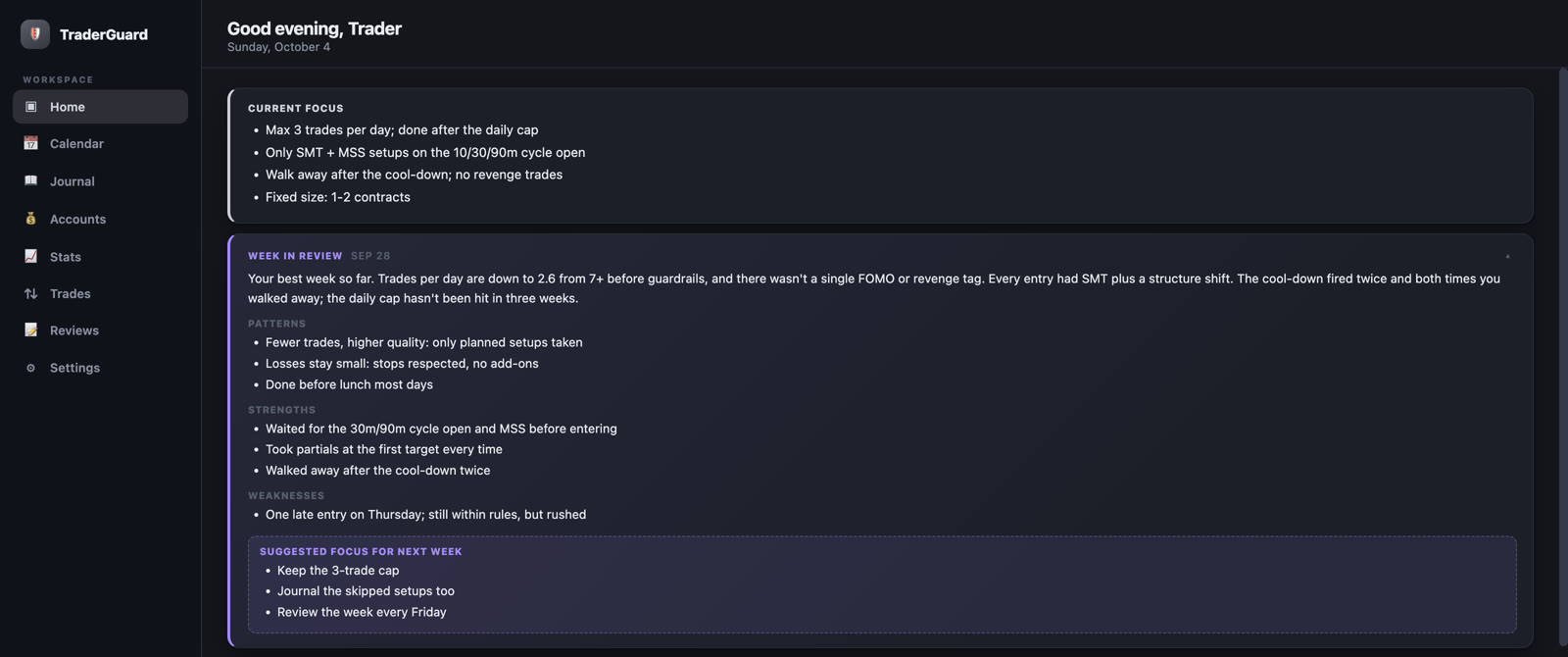
The part of trading an indicator can't fix.
Most blown days come from the fourth trade, not the first. TraderGuard sits next to your chart and holds you to the rules you set when you were calm.
- Connects to TradingView and follows your open positions as you trade.
- Steps in before you overtrade. Hit your daily cap or a losing streak and it puts a calm-down screen and a cool-down in front of you.
- Reviews your week from your journal, flags FOMO and revenge trades, and suggests what to focus on next.
Traders found the free version on their own.
We published The SMT Detector Intraday as a public script in April with no ads behind it. Traders boosted it and kept coming back for the updates.
Figures from the script's TradingView page, October 2026.
- Published3m, 10m, 30m, 90m and Session cycles, auto-picked comparison tickers, stacked labels per swing.
- Faster invalidationMarkers clear the moment price reaches the level, with no candle-by-candle lag on higher timeframes.
- Timezones and cleaner labelsSessions run on exact New York time, Session SMT commits at 16:00, Gold and Silver use inverse logic against DXY, and a new Simple label format.
Start free. Upgrade when you want alerts.
The free version runs the same detection engine on the intraday cycles. Pro adds the higher timeframes, alerts and everything else in the kit.
Free
The SMT Detector Intraday
Get the free version- 3m, 10m, 30m, 90m and Session cycles
- Comparison tickers picked for you
- Session names on every label
- Markers stay until price trades through them
- Trading Timer for macOS
Pro
Billed $279 a year instead of $348. About $0.76 a day.
Start free trial- All 10 cycles, Daily through Yearly included
- Alerts for every cycle in TradingView (setup guide)
- Confluence dashboard across both tickers
- Manual tickers, inverse pairs, label styles
- Time Cycles, ImBalance Detection, SSMT QT, Time Cycles QT
- TraderGuard and Trading Timer for macOS
Checkout and cancellation are handled by Whop. After you join, the setup guide shows you how to claim the indicators on TradingView.
Before you join
How do I get the indicators onto TradingView?
After you join on Whop, open each indicator in the Whop sidebar and enter your TradingView username. Access is added to that account, and the indicators then appear in TradingView under Indicators → Invite-only scripts. The free version is a public script you add to favourites. The setup guide walks through both with pictures.
Do the signals repaint?
No. Once a divergence is confirmed on the chart it stays as drawn. A marker is removed only when price trades through the level it marked.
Which markets does it work on?
US index futures (NQ, ES, YM, RTY), the major forex pairs, crypto (BTC, ETH, SOL) and metals (Gold, Silver, with DXY as an inverse pair). It picks the comparison tickers for your chart, and Pro lets you set your own.
What's the difference between Free and Pro?
Free covers the 3m, 10m, 30m, 90m and Session cycles. Pro adds Daily, Weekly, Monthly, Quarterly and Yearly, alerts for every cycle, the confluence dashboard, manual tickers and label styling, plus the other four indicators and the TraderGuard app.
How is SMT different from RSI or MACD divergence?
RSI and MACD divergence compare price with an oscillator calculated from that same price. SMT compares your market with another correlated market that is actually trading, so the signal comes from two real order books disagreeing.
Is this the same as TMU's SMT Detector or smtdetector.com?
No. The SMT Detector at thesmtdetector.com is an independent product, published on TradingView by mohitshrm and sold on Whop. It is not affiliated with TMU, Frank369 or smtdetector.com. It uses the same ICT cycle lengths (3, 10, 30 and 90 minutes) that many SMT traders know, and adds Session, Daily, Weekly, Monthly, Quarterly and Yearly cycles.
Can I cancel any time?
Yes. Subscriptions are managed on Whop and you can cancel there whenever you like. Access continues until the end of the period you paid for.